08 - Specific BerlinGroup Implementation

QWAC verification

A valid QWAC Certificate for PSD2 is required to access the Sandbox and Berlin Group API. The following conditions are verified:

  • The certificate must be valid (the connection date is strictly between the creation date and the expiration date of the certificate)
  • The certificate must be issued by a QWAC Certificate Authority. The official list of QTSP is available on the eIDAS Trusted List
  • The certificate should not be revoked
If one of the conditions is not fulfilled, the connection is closed and the TPP received an HTTP 403 response (Access forbidden).

A TPP can provide and use any number of valid certificates as long as the CA properties and organizationIdentifier stay the same. The old certificates are not revoked when a new valid certificate is presented by the TPP and can be kept in use until their expiration date is passed.

SCA Approach Supported
Redirect OAuth 2.0 workflow
App redirection using App-to-App redirection based on deep linking workflow
Decoupled workflow
Embedded workflow
Services Supported
Support of multiple consents
Support of Signing Baskets
Support of Card Accounts Endpoints
Support display of Account ownerName and ownerNames
Support display of Account psuName
Owner name always delivered without taking into account the consent scope
Support of Trusted Beneficiaries endpoint
Support of Multilevel SCA Approach
Maximum Frequency Per Day Value Supported on Consent Request 4
SCA Validity for a current consent 180 days
SCA Validity for a one-off consent 20 min
Consent establishment Timeout 3 days
Support of parameter withBalance on APIs
Supported Account Reference Identifiers IBAN
MaskedPan
BBAN
Consent scope Dedicated consent (List of accounts)
Dedicated consent - Support of ownerName in additionalInformation property
Dedicated consent - Support of trustedBeneficiaries in additionalInformation property
Global consent - availableAccounts = allAccounts
Global consent - availableAccountsWithBalance= allAccounts
Global consent - allPsd2= allAccounts
Global consent - availableAccounts = allAccountsWithOwnerName
Global consent - availableAccountsWithBalance= allAccountsWithOwnerName
Global consent - allPsd2= allAccountsWithOwnerName
Supported Access for MultiCurrency Accounts
Multicurrency level Aggregation level
Sub-account level
Aggregation & sub-account level
Balance Type closingBooked
expected
openingBooked
interimAvailable
interimBooked
forwardAvailable
Supported Transactions Query Parameters bookingStatus = booked
bookingStatus = pending
bookingStatus = both
bookingStatus = all to request all types of transactions (pending, booked and information) at once
dateFrom
dateTo
entryReferenceFrom
deltaList
Support of Standing orders endpoint (bookingStatus=information)
Supported optional transaction information (Standing Orders) debtorName
instructionIdentification
remittanceInformationUnstructuredArray
remittanceInformationStructuredArray
creditorAgent
debtorAgent
balanceAfterTransaction
Services Supported
Support of Signing Baskets
Payment initiation Timeout 2 days
Support of PIS without IBAN - Retrieval of debtor accounts with AIS flow
Selection of debtor account on CBS pages when payment submission without IBAN
Funds Availability on Payment Status Information (implicit FCS over PIS)
Support of TPP-Rejection-NoFunds-Preferred Header
Support payment status notification (instant payment only)
Mandatory Authorisation on Payment Cancellation
Supported Access for MultiCurrency Accounts
Multicurrency level Aggregation level
Sub-account level
Aggregation & sub-account level
Support display of ownerNames in payment status request
Support display of psuName in payment status request and SCA status request


Support of SEPA credit transfers

Payment services

Single payments

Periodic Payments

Bulk Payments

Support
Cancel
Support of Future Dated Payments
Multilevel SCA Approach

Optional properties management on payment

Single payments

Periodic Payments

Bulk Payments

debtorId
debtorName
ultimateDebtor
currencyOfTransfer
instructionIdentification
exchangeRateInformation
creditorAgentName
creditorId
creditorNameAndAddress
ultimateCreditor
purposeCode
chargeBearer
remittanceInformationUnstructured
remittanceInformationUnstructuredArray
remittanceInformationStructured
remittanceInformationStructuredArray
paymentInformationId
requestedExecutionDate
requestedExecutionTime


Support of crossborder payment

Payment services

Single payments

Periodic Payments

Bulk Payments

Support
Cancel
Support of Future Dated Payments
Multilevel SCA Approach

Optional properties management on payment

Single payments

Periodic Payments

Bulk Payments

debtorId
debtorName
ultimateDebtor
currencyOfTransfer
instructionIdentification
exchangeRateInformation
creditorAgentName
creditorId
creditorNameAndAddress
ultimateCreditor
purposeCode
chargeBearer
remittanceInformationUnstructured
remittanceInformationUnstructuredArray
remittanceInformationStructured
remittanceInformationStructuredArray
paymentInformationId
requestedExecutionDate
requestedExecutionTime

Identification management for crossborder payment

Supported

IBAN
IBAN + BIC + Country Code
IBAN + BIC
BBAN + BIC + Country Code
BBAN + BIC


Support of Instant SEPA credit transfers

Payment services

Single payments

Periodic Payments

Bulk Payments

Support
Cancel
Support of Future Dated Payments
Multilevel SCA Approach

Optional properties management on payment

Single payments

Periodic Payments

Bulk Payments

debtorId
debtorName
ultimateDebtor
currencyOfTransfer
instructionIdentification
exchangeRateInformation
creditorAgentName
creditorId
creditorNameAndAddress
ultimateCreditor
purposeCode
chargeBearer
remittanceInformationUnstructured
remittanceInformationUnstructuredArray
remittanceInformationStructured
remittanceInformationStructuredArray
paymentInformationId
requestedExecutionDate
requestedExecutionTime


Support of Target2 payment

Payment services

Single payments

Periodic Payments

Bulk Payments

Support
Cancel
Support of Future Dated Payments
Multilevel SCA Approach

Optional properties management on payment

Single payments

Periodic Payments

Bulk Payments

debtorId
debtorName
ultimateDebtor
currencyOfTransfer
instructionIdentification
exchangeRateInformation
creditorAgentName
creditorId
creditorNameAndAddress
ultimateCreditor
purposeCode
chargeBearer
remittanceInformationUnstructured
remittanceInformationUnstructuredArray
remittanceInformationStructured
remittanceInformationStructuredArray
paymentInformationId
requestedExecutionDate
requestedExecutionTime


Periodic payments options Supported
Support of Day Of Execution
Supported Execution Rules Following
Preceding
Supported Frequencies Daily
Weekly
EveryTwoWeeks
Monthly
EveryTwoMonths
Quarterly
SemiAnnual
Annual
MonthlyVariable


Services Supported
Support of Funds Confirmation Endpoints
Creation of Funds Confirmation consent by TPP
Support Access for MultiCurrency accounts
Multicurrency level Aggregation level
Sub-account level
Aggregation & sub-account level
Enable "on this page" menu on doc section
On

07 - Perform a Strong Customer Authentication

Description

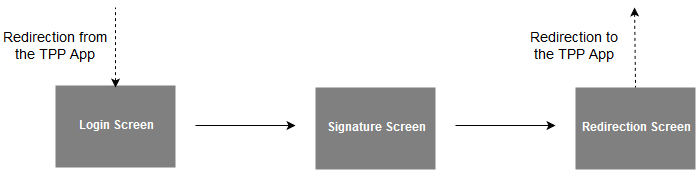
To carry out its strong authentication on the ASPSP side, the PSU will be redirected from the TPP APP through several pages within the workflow described below.

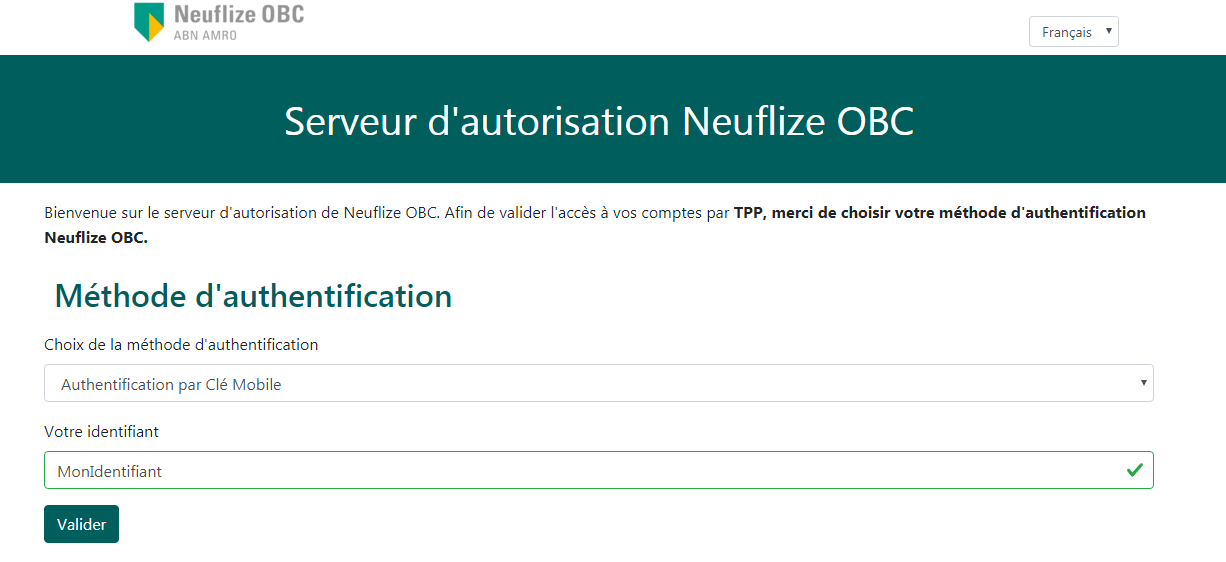
AIS Login Screen

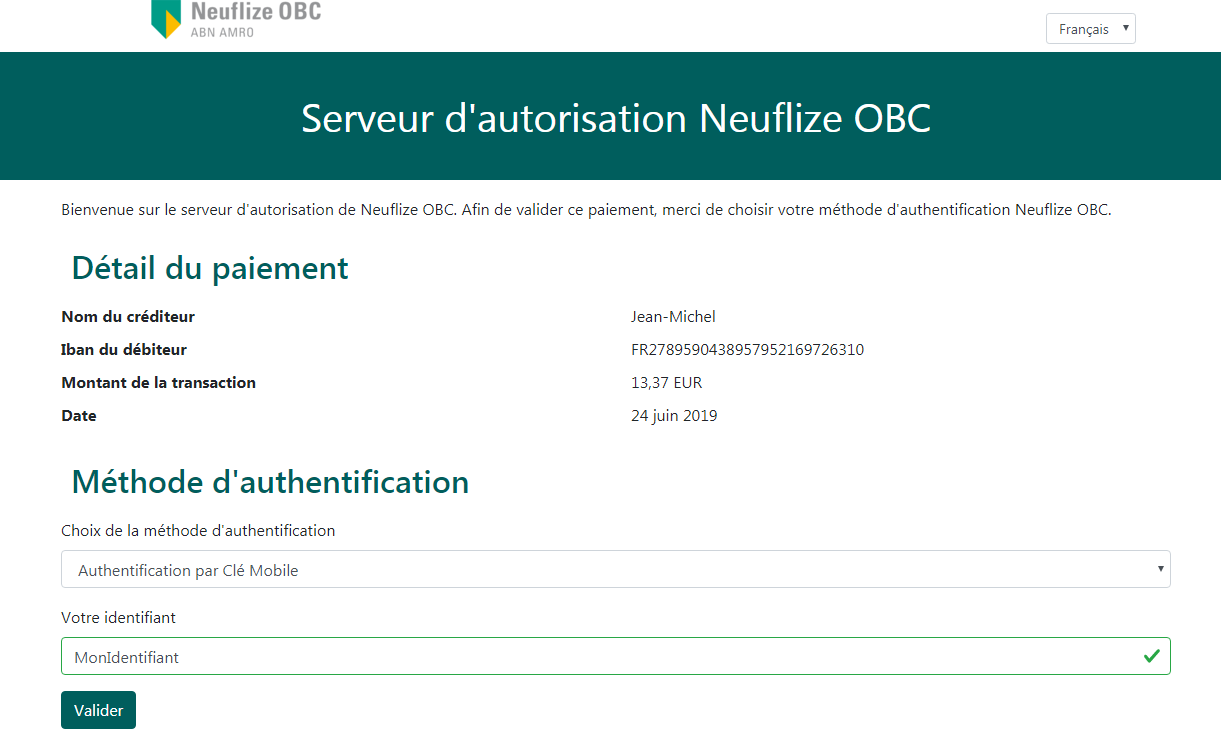
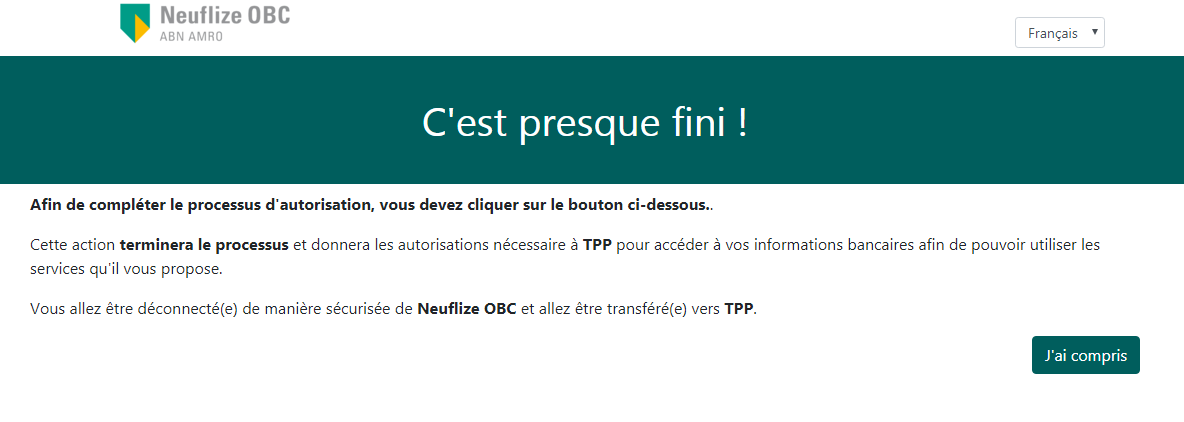
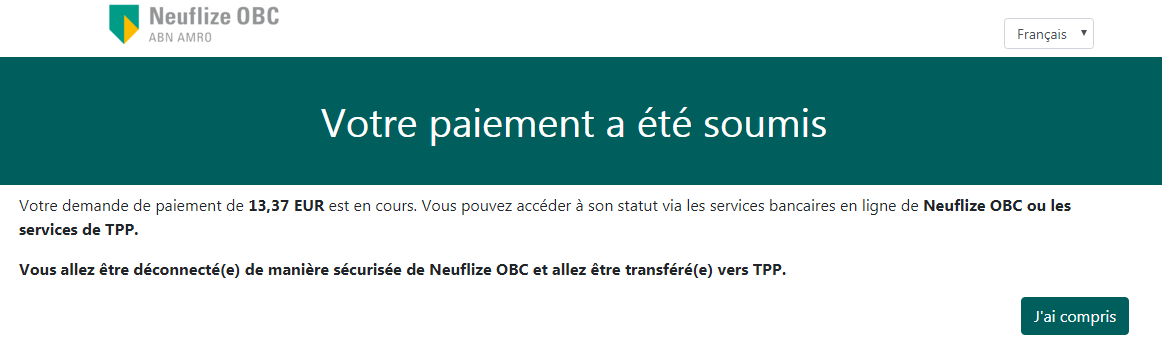
Before being redirected to the TPP App, the PSU will access a redirection screen with some context related to the given authorisation. This screen is slightly different for AIS and PIS.

PIS Login Screen

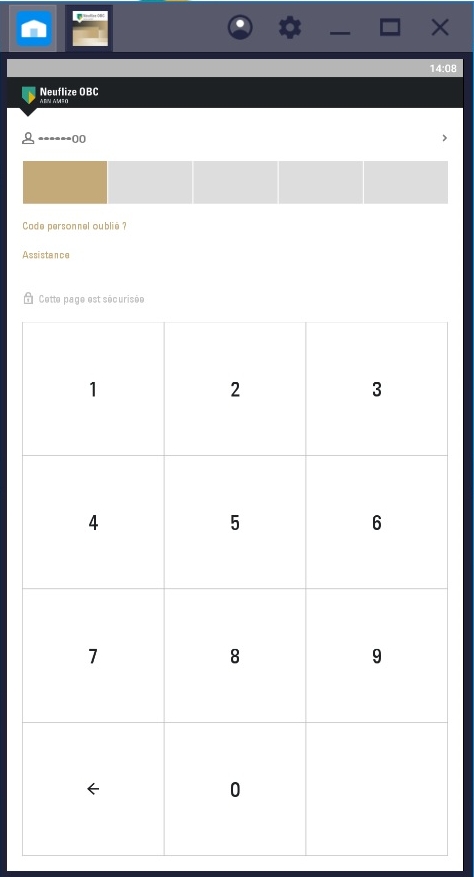
Clé mobile

AIS Redirection Screen

PIS Redirection Screen

Enable "on this page" menu on doc section
On

06 - Request a Confirmation of Funds

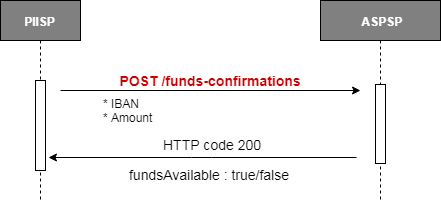
Creates a confirmation of funds request at the ASPSP. Checks whether a specific amount is available at the time of the request on an account identified by its IBAN. A PIIS consent has to exist in order to perform this request.

POST /berlingroup/v1/funds-confirmations

For specific BerlinGroup Implementation on the Fund Confirmation Service, please refer to specific implementation How To.

Enable "on this page" menu on doc section
On

05 - Manage payments information and status

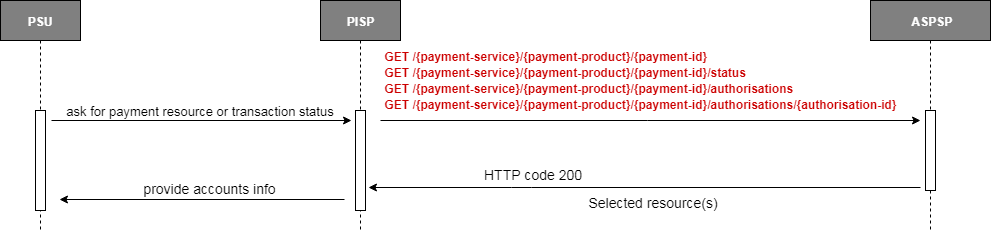
To access a payment resource or the status of a related transaction several endpoints are available. The APIs are listed below. All specifications of these APIs can be found on the API page of this developer portal.

Note that to access payment resources, you don't need to provide an access token in requests if the payment has been initiated through a redirect Oauth2 workflow

Retrieve a Payment
GET /berlingroup/v1/{payment-service}/{payment-product}/{payment_id}

The TPP can retrieve the payment resource using the API above.

Retrieve a transaction's status
GET /berlingroup/v1/{payment-service}/{payment-product}/{payment_id}/status

The TPP can retrieve the transaction status of a given payment using the API above.

Get the authorisations of a specific payment resource
GET /berlingroup/v1/{payment-service}/{payment-product}/{payment_id}/authorisations

TPP can retrieve the list of all the authorizations linked to the payment resource using the API above.

Retrieve an authorisation associated to specific payment resource
GET /berlingroup/v1/{payment-service}/{payment-product}/{payment_id}/authorisations/{authorisationId}

The TPP can retrieve the status of an authorization linked to the consent resource using the API above.

For specific BerlinGroup Implementation on the Payment Initiation Service, please refer to specific implementation How To.

Enable "on this page" menu on doc section
On

04 - Access Account Information Services

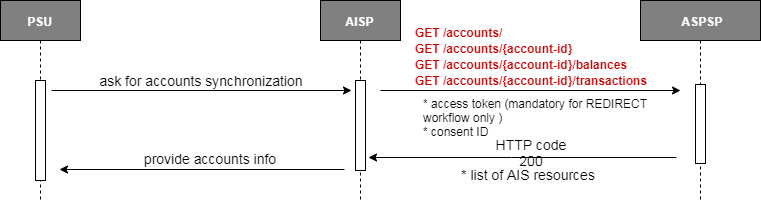
To access all AIS API, a valid consent established between the TPP, the PSU and the ASPSP is required. In addition, when TPP are using the REDIRECT workflow, they must also provide the access token related to the given consent. The APIs accessible with this consent are listed below. All specifications of these APIs can be found on the API page of this developer portal.

Get list of accounts
GET /berlingroup/v1/accounts

Returns all the accounts (at least payment accounts) that the ASPSP managed for the PSU.

Get details about an account
GET /berlingroup/v1/accounts/{account-id}

Retrieve all the characteristics of a specific account Characteristics include - Balances (current, available) - Label - Account number - Type of the account.

Get account balances for an account
GET /berlingroup/v1/accounts/{account-id}/balances

Returns the balances linked to the account specified.

Get transactions for an account
GET /berlingroup/v1/accounts/{account-id}/transactions

Returns the transactions linked to the account specified.

Specific behaviour for old transactions:

Retrieving transactions older than 90 days is authorised only if the consent is valid during 20 minutes after the SCA was performed.

In the case of a one-off consent, all accounts access are authorised within these 20 minutes.

In the case of a current consent, the access to the transactions prior to 90 days is restricted to the first request for the associated account after the SCA was performed.

Pagination mechanism:

If not all transactions can be returned in a single call, a pagination mechanism is included to manage the historical depth of transactions to return through a 'page' query parameter. Response body include navigation links for paginated account reports which allow redirection to first, next, previous or last page. By default the first page is indexed as 0. 

Calculation rule for the 4 calls per day at the initiative of the TPP

TPP can access each AIS resources at a maximum of rolling 4 times period per day. For example:

  • GET ../accounts -> 1st call on accounts
  • GET ../accounts/accountAAA/balances -> 1st call on Account AAA balances
  • GET ../accounts -> 2nd call on accounts
  • GET ../accounts/accountBBB/transactions -> 1st call on Account BBB transactions
  • GET ../accounts/accountAAA/balances -> 2nd call on Account AAA balances
Pagination mechanism

The counter is not incremented when calling the same endpoint with a different page number within 15 minutes. However, in case of a second call further in the day on the endpoint with the same query parameters (page excluded), the incrementation is applied. For example:

  • Within 15 minutes of the same request: counter is not incremented
  • GET ../accounts/accountAAA/transactions/ ?page 0 -> counted as same request
  • GET ../accounts/accountAAA/transactions/ ?page 1 -> counted as same request
  • GET ../accounts/accountAAA/transactions/ ?page 0 -> counted as same request
  • ... more than 15 minutes later: counter is incremented
  • GET ../accounts/accountAAA/transactions/ ?page 0 (More than 15 minutes after the last call) -> counted as new request

For specific BerlinGroup Implementation on the Account Information Service, please refer to the specific implementation How To.

Enable "on this page" menu on doc section
On

03 - Cancel a Payment

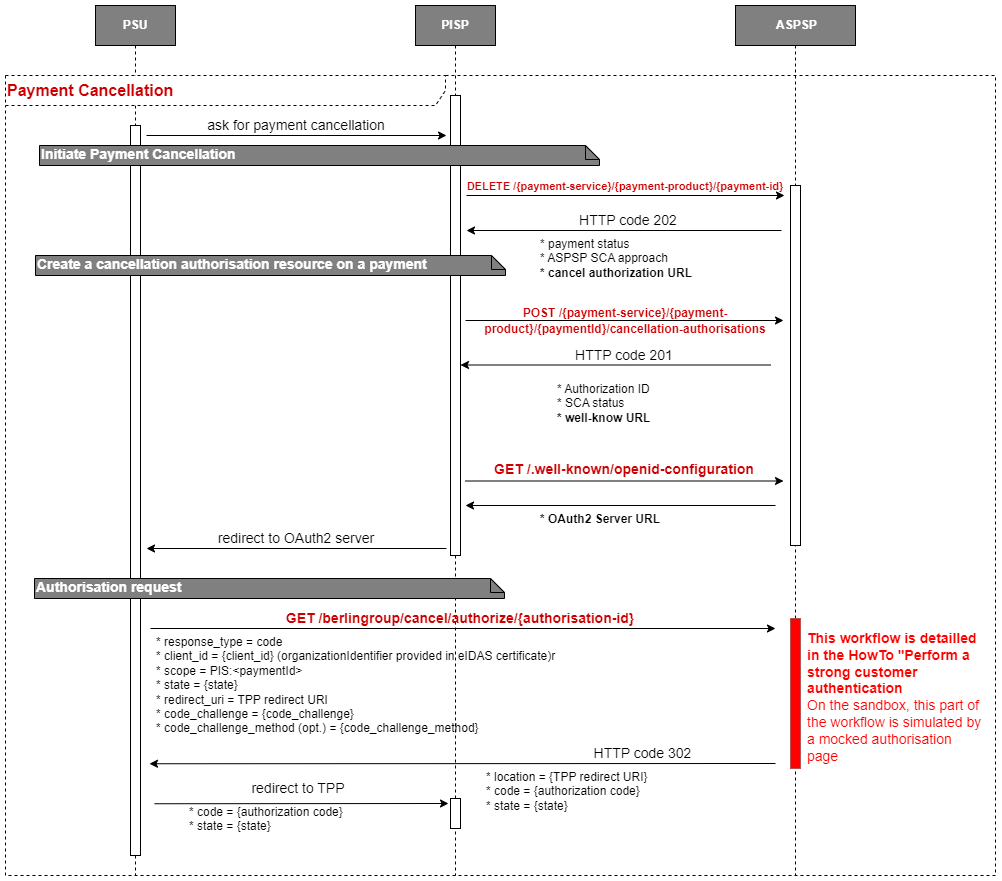
For the purpose of carrying out a payment cancellation with the XS2A APIs, it is necessary for the TPP to ask for the cancellation to the ASPSP.

In this approach, the PISP has to proceed with an OAuth2 authorization. The cancellation request is established and validated thanks to a redirection of the PSU towards the ASPSP Authentication platform.
See How to Perform a Strong Customer Authentication for details.

Initiate Payment Cancellation
DELETE /berlingroup/v1/{payment-service}/{payment-product}/{paymentId}

Asks for payment cancellation at the ASPSP for a given payment (giving id, service and product). Specificities for this API and available services and products are listed in the dedicated HowTo.

Create a cancellation authorisation resource on a payment
POST /berlingroup/v1/{payment-service}/{payment-product}/{paymentId}/cancellation-authorisations

Creates an authorisation sub-resource of the payment resource for its cancellation and start the authorisation process.

Authorization request
GET /berlingroup/authorization/authorize/{authorisation-id}

Requests an authorisation from a PSU following the OAuth2 protocol. Details of the authentication workflow and user interfaces are described in the dedicated HowTo section.
Our specificities regarding the OAuth2 protocol are listed below.

response_type : code
code_challenge_method : S256

After successful authorisation, the user will be redirected to the redirect URI provided in the request with the following parameters :

https://your_redirect_uri?code=authorization_code&state=test

For specific BerlinGroup Implementation on the Payment Initiation Service, please refer to specific implementation How To.

Enable "on this page" menu on doc section
On

02 - Initiate a Payment

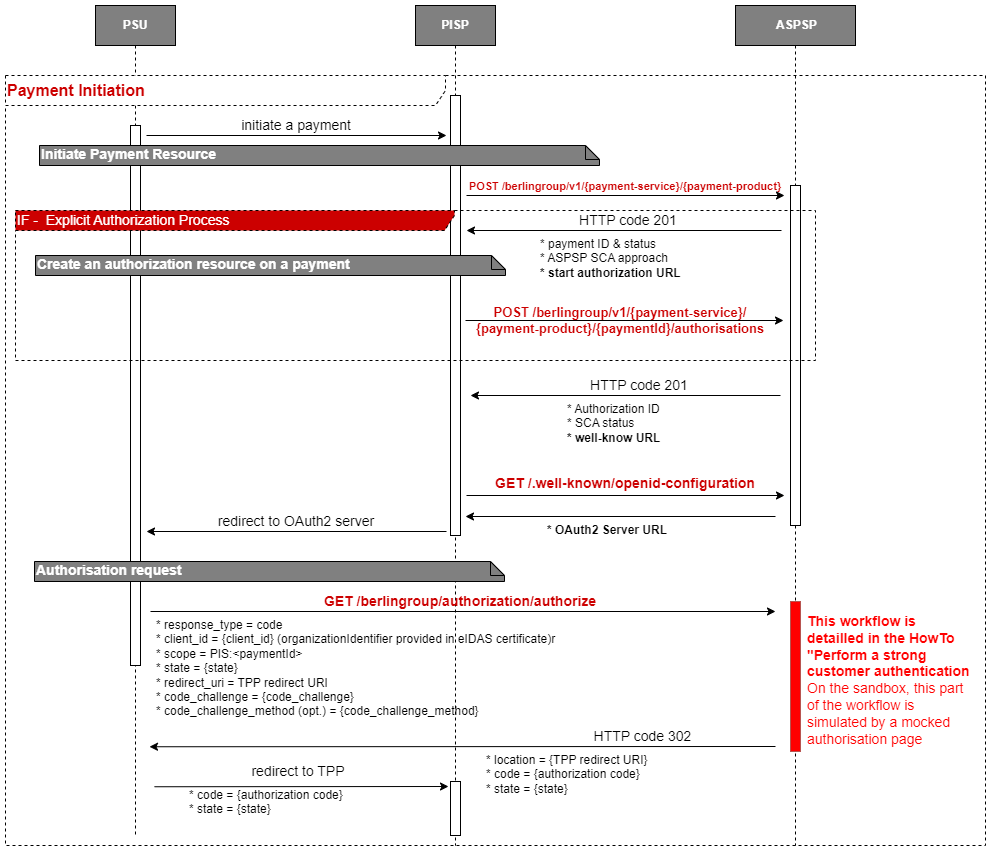
For the purpose of carrying out a payment initiation with the XS2A APIs, it is necessary to establish a consent between the TPP, the PSU and the ASPSP.

In this approach, the PISP has to proceed with an OAuth2 authorization. The consent is established and validated thanks to a redirection of the PSU towards the ASPSP Authentication platform.
See How to Perform a Strong Customer Authentication for details.

Note that to access payment resources, you don't need to provide an access token in requests if the payment has been initiated through a redirect Oauth2 workflow

Initiate Payment Resource
POST /berlingroup/v1/{payment-service}/{payment-product}

Creates a payment resource at the ASPSP for a given payment service and product. Specificities for this API and available services and products are listed in the dedicated HowTo.

Create an authorisation resource on a given payment
POST /berlingroup/v1/{payment-service}/{payment-product}/{paymentId}/authorisations

Create an authorisation sub-resource of the payment resource and start the authorisation process.

The usage of this access method is only necessary if the TPP has asked to start the authorisation process separately from the payment initiation (using the “TPP-Explicit-Authorisation-Preferred” Header).

Authorization request
GET /berlingroup/authorization/authorize/{authorisation-id}

Requests an authorisation from a PSU following the OAuth2 protocol. Details of the authentication workflow and user interfaces are described in the dedicated HowTo section.
Our specificities regarding the OAuth2 protocol are listed below.

response_type : code
code_challenge_method : S256

After successful authorisation, the user will be redirected to the redirect URI provided in the request with the following parameters :

https://your_redirect_uri?code=authorization_code&state=test

The PIS with no IBAN / Combined Service is a feature of the AIS consent. It allows a PISP to retrieve the list of account through an AIS request when it should not be able to do so.

Thanks to this feature, a PISP can offer a smooth PIS workflow where the PSU select a debtor IBAN from his/her account list instead of entering the IBAN manually.

Prerequisites

TPPs with only the PISP role can only use the global consent scope availableAccounts: allAccounts.

An AIS Combined Service Consent can be one-off.

The property combinedServiceIndicator has to be set to true in the body of the request.

The combined service AIS consent is not supported for a multi authorization payment.

For specific BerlinGroup Implementation on the Payment Initiation Service, please refer to specific implementation How To.

Enable "on this page" menu on doc section
On

01 - Manage Consents for Account Information Service

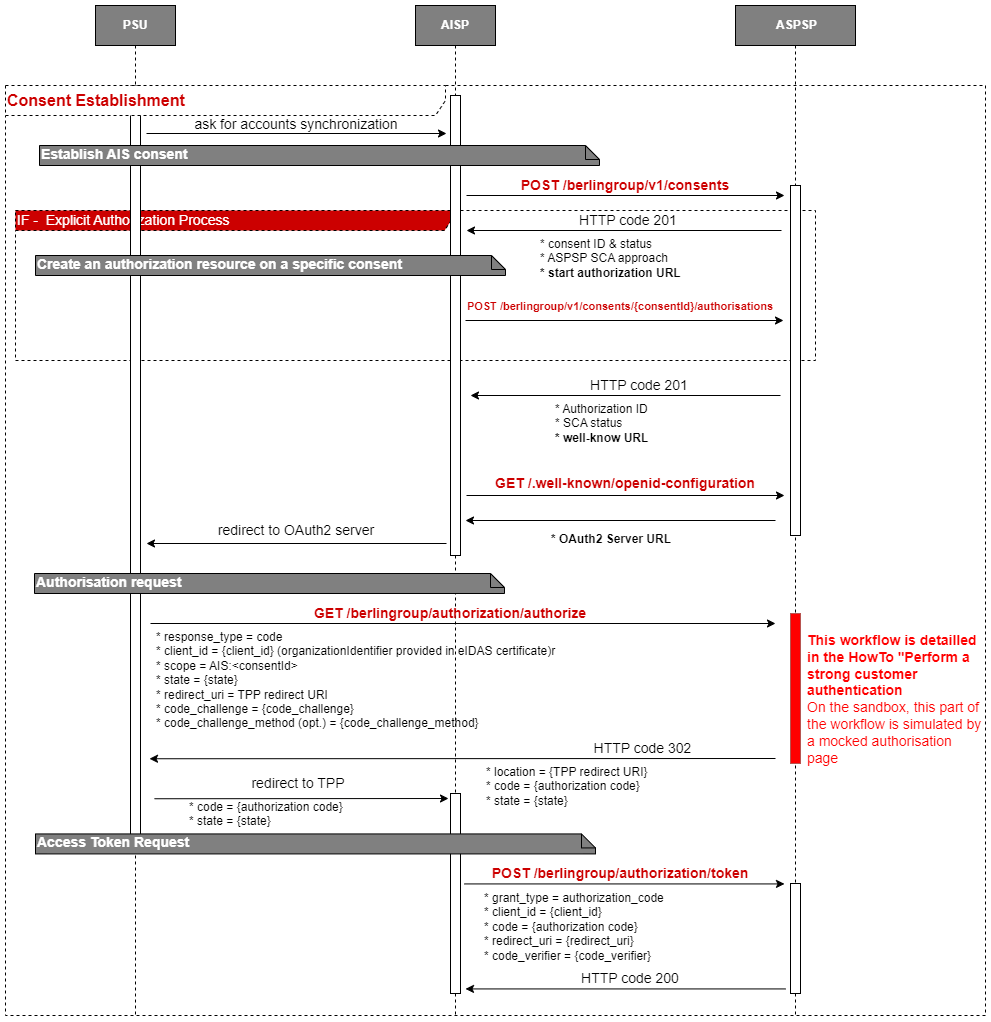
To access all AIS APIs, it is necessary to establish a consent between the TPP, the PSU and the ASPSP.

In this approach, the AISP has to proceed with an OAuth2 authorization in order to retrieve a time-limited access token.
This access token is mandatory to access all the AIS PSD2 APIs. It is associated to the consent established and validate thanks to a redirection of the PSU towards the ASPSP Authentication platform.
See How to Perform a Strong Customer Authentication for details.

Establish AIS Consent
POST /berlingroup/v1/consents

Creates a consent resource at the ASPSP regarding access to accounts specified in this request. Specificities for this API are listed in the dedicated HowTo.

Create an authorisation resource on a specific consent
POST /berlingroup/v1/consents/{consentId}/authorisations

Creates an authorisation sub-resource of the consent resource and start the authorisation process.

The usage of this access method is only necessary if the TPP has asked to start the authorisation process separately from the consent establishment (using the “TPP-Explicit-Authorisation-Preferred” Header)

Authorisation request
GET /berlingroup/authorization/authorize/{authorisation-id}

Requests an authorisation from a PSU following the OAuth2 protocol. Details of the authentication workflow and user interfaces are described in the dedicated HowTo section.
Our specificities regarding the OAuth2 protocol are listed below.

response_type : code
code_challenge_method : S256

After successful authorisation, the user will be redirected to the redirect URI provided in the request with the following parameters :

https://your_redirect_uri?code=authorization_code&state=test
Access Token Request
POST /berlingroup/v1/token

Requests an access token using the authorization code retrieved from the PSU authorization. This Access Token can be refreshed. The duration of access token is 1 hour, and the duration of refresh token is 180 days.

Retrieve the Consent
GET /berlingroup/v1/consents/{consentId}

The TPP can retrieve the consent resource using the API above.

Retrieve the Consent’s status
GET /berlingroup/v1/consents/{consentId}/status

The TPP can retrieve the consent's status using the API above.

Get the authorisations of a specific consent resource
GET /berlingroup/v1/consents/{consentId}/authorisations

The TPP can retrieve the list of all the autorisations linked to the consent resource using the API above.

Get an authorisation from a specific consent resource
GET /berlingroup/v1/consents/{consentId}/authorisations/{authorisationId}

The TPP can retrieve the status of an autorisation linked to the consent resource using the API above.

Delete a Consent resource
DELETE /berlingroup/v1/consents/{consentId}

The TPP can use this API to terminate a consent.

Submitting a POST /consents request with the property recurringIndicator=false and frequencyPerDay=1 allows you to create a one-off consent.

In this particular case, all AIS accounts access are authorised for a period of 20 minutes

Neuflize offers TPP a Multiple Consents Service that follows the Berlin Group NextgenPSD2 suggested implementation.

This service allows TPP to have multiple valid consents at the same time. This implies that TPPs may have different valid access token for the same PSU.

If this feature is used by the TPP, it is its responsibility to relate the consented data with the proper consent and access token.

The main impact of this service lies in the fact that, in case of a pre-existing and currently valid consent, a newly validated consent creation request will not automatically revoke the pre-existing consent. The TPP is then also responsible of revoking consents that are not used by the PSU anymore.

For specific BerlinGroup Implementation on the Account Information Service, please refer to the specific implementation How To.

Enable "on this page" menu on doc section
On